Friday, August 31, 2012

Hm...

Meh... its weird... that recently i'm actually posting more on my LJ then here lol. Normally it'll be otherwise but well...

Going to the IT show with jlf tmr! She's gonna buy a Nex 5 while i'll be helping my dad check out the price of fujifilm x10. He's been looking at it since like a million years ago... almost wanted to buy during the last IT show but didnt cos of the ORB sensor issue.

Ah yes... dear jlf says that she's got a present for me already, and will pass me on sun... really excited to see what it is... o.o

Clues: she's not gonna bring it tmr cos it's kinda bulky. Bulky o.o ?!?!
She wonders if i have it already... hopes that she doesnt remember wrongly... o.o

huh? totally clueless...! hardly ever been so looking forward to receiving a gift...! thanks dar!

Friday, August 17, 2012

things.....

to do tmr:

1. upload photos to facebook
2. download 搜狗拼音输入器for mac. i nvr knew they have a mac version too! <3
i wonder if i can find a good 3rd party japautnese language input software for mac too - cos there's always problem with the original input software from mac somehow for me... it takes like a million years to switch between languages, and sometimes even hangs up my comp! read before that you have to like repair permissions or something - did that, was ok for a while,  but then it came back again zzzzzzzz. meh. the sougou thing is sooooo cute... dont they have a japanese add on for it too? T.T its really convenient too... and there's like a million skins they made for you to pick... really love it......

3. lvl up my soul seed as much as possible on trickster
4. download and install bloons td 5 deluxe on mac, and install it on xp as well.
yeah! i paid for deluxe, but i think it'll be worth the money... been enjoying every single bloons td release so far... td 5 has been a delight to play everyday (or almost everyday), loads of new content... new towers, new agents, new maps, daily challenges... now even those tower boosting upgrades/buildings thing that you can buy with monkey money... really makes the game so very enjoyable. cant wait to play it! just that bleah i've got trickster events and stuff to do too... and i still haven found a job. :X

5. what else is there? :X

also been playing back swords and potions recently. its a nice buying/selling rpg game... friendly ppl there too :)

went to botanic gardens with jlf today... shall try and upload some pics tmr. heck, i've not yet uploads the gardens by the bay pics from...... idk how long ago :X opps :X

k, that's all for now.

Wednesday, August 08, 2012

Curiosity's Descent

watching...

watched quite a bit of olympic action yesterday...

table tennis women's team - sg won korea... not very exciting tho, but was interesting to see the expedite rule come into play - learnt a bit more abt table tennis rules today.

women's vball quarter finals between china and japan was stunning. super exciting... made me wonder for a while if it was the finals already... they were like neck and neck in the scoring.

gymnastics beam was exciting, and in floor aliya mustafina got a surprising bronze to get her 4th olympic medal. zonderland also put up a fantastic high bar performance. stunning skills, tho not that perfect execution... but the difficulty is just incredible.

Monday, August 06, 2012

FYP, Convocation...

Its been so long since i posted here about school stuff...

Been slacking all along...

FYP ended successfully... despite me rushing non-stop for like two days at the end... things were really last minute... the friday before submission (mon 4pm DEADline), we were still carrying out experiments till really really late at night. With the data to be included in the written report...

At least the experiment worked out...

Things was really really drama at the end i tell you....

The last experiment we did was a pcr... after that we ran our products on a gel and took pics of the result...

Unfortunately... in my rush... i did notice that the files had a weird .1sc format... but i thought i could easily get some external program to open it...

HOWEVER... that was not the case... after trying all sorts of photo editing program... i FINALLY came upon bio-formats that is said to be able to open it... after downloading the program however... i was totally confused as it didnt seem to be doing anything at all. further searching and i finally understood that its actually a plugin for the software ImageJ....

Things was quite frustrating at the end… i was clearly behind in my report writing, and got really frustrated when my buddy kept asking me for help on the simplest of all things. Made me really really frustrated as i felt i was constantly spoon-feeding her. And its not like we're a team or anything, sure we are friends, working on similar things for our FYP, but everything is graded individually… I'm not obliged to help her and the thing is that it doesn’t feel like a fair exchange of ideas. i felt like i was the only one bringing things to the table while she was just feeding off me. It really made me doubt if she even had the ability to do anything on her own at all, though she put me wrong as she too, managed to find the bio-format and imagej software. So what was she doing all along then? Must she ask me to send her EVERY SINGLE THING? Every website, every small program i use… yeah it was really frustrating.

But its all over now. Report was really last minute tho, wrote for almost 3 days and only finished on the morning that it was due… started printing out the report at like 11+am when i had to submit it by 4pm… its like… I'd just kill myself if anything went wrong with the printer or something :X

Either way… its all over now.

Ah and poster presentation. Was crap. As in… i didn’t get a single examiner. Stood there for 2 days and no examiner. meh. it really made me sad… i was so ready to present my poster which i put a lot a lot of effort into… made the pictures look really nice and such… i wasn’t the only one who didn’t get an examiner tho...

My mentor wanted to keep my poster… so all i've left are memories and pictures. oh and the soft copy, of course. sighs… i still can't help but think about my pretty molecule alignment picture… well all credits to pymol of course… but then again many others, my friend included, didn’t know how to get a high res picture out of pymol so….

And yes… convocation is over too. Nothing much really, just going on stage to get the folder, getting the transcript with my horrible results at the back of the hall… haiz.

Pics some other day maybe… :X yes i am a procrastinator. 3 months to post about my fyp? lol!

Curiosity Landed Safely on Mars!

Yes, this is late news i know, but i think its of enough importance that i should post here.

I actually by some miracle (actually, it was twitter who alerted me to the landing time) followed the rover landing through the NASA live webcast and saw the tiny pictures that got mailed back through odyssey.

There's actually truckloads of information regarding the MSL (Mars Science Laboratory) on the NASA webpage.

This is the one of the 1st pic taken by the rover. (All pictures are credit of NASA/JPL-Caltech)

NewImage

Here's another, can see the shadow of the rover here

NewImage

There's a ton of video and other stuff to read on the NASA webpage, do take a look. A whole bunch of videos available on youtube too...

At the JPL (Jet Propulsion Laboratory) during the rover landing


How the rover landed on Mars an explanation - the Seven Minutes of Terror

Wednesday, August 01, 2012

Grats Feng Tianwei!

Grats Feng Tianwei for winning the match against Kasumi Ishikawa of Japan!


Granted, the fact that she isn't a home made and breed Singaporean does irk me a little, but the FACT is that she has improved a lot and played a great game yesterday against China's no. 1 seed, and she finished off her individual battle with a win to get bronze. 

You can choose to view this from many angles, but I simply wish to see it as a deserving athlete getting a hard earned medal.

Well done! Feng Tianwei FTW!

Now let's hope they can defend their sliver team medal… or even one up that!

Monday, July 30, 2012

Mountain Lion

Finally went to dl mountain lion last night. 4.37gb large. I just left my comp on overnight to dl. Finished at 6:23am today... Took like maybe 3 and a half hours... Really long! Installing it on my lappy n my dad's lappy now. 34 mins remaining for mine and 30mins more on my dad's.


- Posted using BlogPress from my iPhone

Sunday, July 29, 2012

Explore the world...

Stumbled upon an article on techland about live webcams of animals. Explore.org lets you view videos of animals all around the world live from your browser...!


There's like... a gazillion more videos on the site so do check it out!

TODAYonline | World | Man who pretended to be blind died in ditch

TODAYonline | World | Man who pretended to be blind died in ditch

this is... ouch

London Olympics!

Ah so sleepy... but i had a great time watching the olympics today... well bits here and there, but i watched most of the men's gymnastic sub div 2 qualifications!

Japan came off to quite a shaky start... meh... excited abt the team finals XD

Saturday, May 05, 2012

Almost there...

So I'm finally done with my poster design... barring any mistakes or changes that my mentor wants... and pending changes from my dad and my sis (like i asked them to give comments on the color scheme and stuff, the science and the actual content they don't understand ><)
well my sis is way better than art then i am (actually, my dad too), so i asked her to give some comments on my poster yesterday... i was telling her that i tried to make my poster as less wordy as possible... but she was like 'huh? u call this not wordy?' gah! It can't be helped that the intro, methods, objectives, and conclusions all HAVE to be in words right? tch! Already i've put like huge pictures and graphs to make things as pleasing as possible - while still retaining its 'scientific-ness'...

I decided to do things differently this time round... following in part my experience at SSEF when i was in junior college. I cut out whole portions of the report from the poster, and didn’t present a lot of the obtained data. I don't want my poster to be a case of too cramped, too much info, and too confusing... i felt that last time i didn’t win at the SSEF cos apart from that fact that I'm not THAT good a presenter (I'm not the very lively, talkative kind), there was also too much info in the poster/report. If I'd cut out the last part of the results entirely and focused on something else instead, the results could have been very different. Regrets regrets sighz... you live and you learn... what else can we do?

So yeah, i cut out the entire lab work part (which wasn’t much to begin with anyway) and only focused on the bioinformatics. I also didn’t attempt to squeeze results for everything for both genes in... either or, not both of them. No tables of long lists of numbers either - i changed it into a graph instead. BLAH that stupid graph took me SOOOO LONG to get done! The new office layout was really confusing for me - cos the last time i work extensively with excel was... like... 5 years ago or something... using the older version of excel. (plus i wasn’t on mac yet). Than direct copying and pasting the graph to powerpoint didn’t work. I was really really pissed with MSoffice then... like WTF on earth are you doing! The graph copies over alright, but it changes the freaking style and everything that I'd painstakenly arranged in excel! and i can't change the style back in powerpoint! Then after googling i found out that i could use the paste special thing or some sort, but it only worked in another ppt doc, not the one with my poster... in the end i took the nice looking copy pasted in the other ppt, saved it as a picture, than imported the picture to my poster. zzzzzzz! so troublesome! The resolution should turn out alright... i hope ><

ah my mentor wanted pictures of bleached corals too... i took like over 5 hours to search for copyright free etcetc images that i can safely use on my poster... finally found several on flickr (i don't use flickr so it too me a while to remember which site it was that had the creative commons license thing, at 1st i went to gettyimages but like nothing is free?) and picked two out of the lot. Next problem was that i didn’t know what species of corals they were... searched around for a bit but only managed to identify one of the two... gave up in the end ><

and than there was the stupid guide tree. oh gosh how many DAYS have i spend on the phylogenetic trees in total? i really lost count! From that time when writing the report to now the poster...! At the beginning i skimmed around for something that can open/plot dnd files... didn’t find anything that worked, so i skimped on the work by screencapping from the clustalw2 website. Than my mentor suggested that we put in bootstrap values... (that was like, a few days before the report was due). So i started google to find out what ARE bootstrap values... (very last minute, i know). Turns out that i had to use clustalx to generate those so... thankfully i downloaded that a while back. So it took me a while to tinker around with that program... and hohoho! It generates the raw files, but you have to use something else to open the raw files. BRAVO! After a lot of fail attempts (some required you to compile the program yourself, but somehow when i try to compile the files it just WONT WORK!, others were like powerpc programs or something which apple withdrew support for in Lion...) i finally got njplot to work. BUT that stupid program could only generate trees that were A4 sized. So things ended up being really cramped...! I ended up having to draw a sub tree for one of my genes zzzzzzz. And that's the big problem too... for my poster i needed the tree to be more like in a landscape kind of orientation (otherwise no space!) which the program can't get me. I ended up resizing the window and screencapping AGAIN. But that's bad because you end up with the tree on a white background. I want the background to be transparent.... -.-''' So i took a million years with photoshop and stuff, in the end i had to trace out the tree in photoshop and type out all the species names separately in powerpoint.... sighz.

So yeah... hopefully everything is alright with the poster now!

Wednesday, May 02, 2012

Poster

Blah... it just started raining HEAVILY. like real heavily. i guess i'll go home late again today.

So next tuesdays n wedn is poster day... discussed with my mentor just now abt the poster and i have quite a bit of work to do. been spending the entire afternoon looking for a nice, copyright free (or watever u call it) pic of bleached corals to use in my poster. Found two nice pics to use in flickr... which I'm free to use as long as i credit the photogs.. hopefully i understood that creative commons thing right that is ><

blah........ that's how I'm feeling right now ><


Really the last last bit left of school to go… report was handed up already last week (after a long struggle) so all that's left is this poster thing.

Wednesday, April 11, 2012

Last bit to go...

busy busy busy...

yeah yeah i know… i've finally broken my 1 post a week promise… but i've got my FYP report to do so yeah… gotta go!

News flash!

SBS Transit has launched a new alert service for its North East Line (NEL) train disruptions.
The service will provide subscribers with information such as the affected stations, availability of shuttle services, and the resumption of services.
It is available free of charge to all iPhone users through the iris application push notification, and to all mobile phone users through the SMS alert service.

To sign up for free SMS alerts, commuters will have to key in 'NEL' and send it to 73535 from their mobile phones. Alternatively, they can also log on to the website www.sbstransit.com.sg to register.
They will receive an SMS acknowledgement to confirm that their requests have been successfully activated. To unsubscribe to this service anytime, they can send 'UNSUB NEL' to 73535.


http://www.straitstimes.com/BreakingNews/Singapore/Story/STIStory_787622.html

.........
with how often SMRT trains are breaking down... you'd think that SMRT would be the 1st one to come up with this but......

Tuesday, March 27, 2012

Lab

So i finally started on lab work stuff last week. Like last Tuesday? Started off with extracting DNA with another fyp student, so that we can sort of get to know the procedures and know where everything is in the lab. prior to that i've not even SEEN the labs bravo.

Following the other fyp student around totally reminded me of my time at ibn when i followed fan around. heck, maybe i reminiscent about the past a bit too much for my own good… but i can't help it, that's just the way i am :X

The way this lab works is totally different from the individual research group style in ibn. There its one group one lab, and in my previous lab our relations between group members was pretty good so… there wasn’t any hard and fast rule like exactly which part of the bench belongs to who… pipettes i just use whatever's on the rack - most of the time there's no name written on it anyway…

Here, its more like an individual thing? like you use your own pipettes and stick strictly to your own space. fyp students in sbs were each rented a set of pipettes… but somehow there was communication disparities… when we emailed the prof to ask, we were told that ppl working in that lab didn’t have to attend the safety briefing (and hence no pipettes)… but other fyp students from my course DID go for the briefings and were given pipettes -.-''' zzzzzzzzzzzzzzzzzzzzzzzzzzz a little zzzzz up to me but yeah… at least we aren't gonna do much lab work… and we're just using my mentor's stuff. and work space. things are kinda weird in here… like the lab ppl were asking why are there suddenly 2 more students in the lab when our mentors did inform them long ago that we will be in the labs. admin stuff tsk. always so troublesome...

working in the lab made me feel… alive though… like i finally have a motive, an end in mind… what to do etc. made me realize that as much as i love doing stuff (games, surfing the web, writing blog entries etc etc etc) on my comp, working wise, i prefer lab work to… bioinfo stuff. granted when u do lab work u still have loads of reading and writing to do, but at least… somehow… the lab work in an anchor? keeps me more focused or something… my place is in the lab… not the office… i feel more at home in the labs.

So we spent the better part of last Friday preparing the reagents… and after that we discussed about the intro.

And yesterday… ah.. my mentor has a habit of coming really late. We were supposed to meet at like 10am, but he turns up after 30mins or so later, and than checks his emails and other stuff on his comp… and we headed off for the labs like… maybe at 11 or so? i actually don't mind the time i have in the morning to use my comp and stuff… its just that starting at 11am? we worked all the way till 4pm. Lunch at 4pm… bravo… my stomach died a bit halfway through :X

So we'll be continuing with the 2nd part of the experiment today. At 2pm he says… i think we'll take till… 7-8pm? since we'll probably start closer to 3 than 2pm. Not the 1st time we ended at 8 though, just last Friday our report discussion took us all the way till 8pm.

ABout the intro that i showed my mentor last Friday… blah… it wasn’t the best piece of work i've ever written… its all broken up in bits of disjointed text… quite a horrible piece of work really. in contrast, my friend has got the intro nicely written up already. Only that i kind of fainted when i saw the 1st part of her intro. It was a totally non-scientific way of writing… in my mind i was like what the hell are you doing? delete that whole 1st para kind of thing :S sighs… the differences between the two of us. i think i kind of over reacted at 1st tho and i was glad i didn’t say anything else i would have been totally rude. my mentor did ask her to change away that part tho so all's well.

I shd care more about my own pathetic piece of writing than criticizing the work of other's. At least they have a proper, flowing introduction already, which is a lot more than what i can say for myself :X

sighz, I'm still the same as before. unable to find the mood to write and only able to do last minute work. no pressure, no work. sighs. At least i don't play games or watch videos in the office, but i do end up spending time to blog instead :X

managed to get mendeley to cite stuff the way my sch wants for my report… sighs. really feeling like a zombie today… and i already slept 7 hours last night… some how its still not enough? sighz.

kk, back to my pathetic intro.

Monday, March 19, 2012

NLB e-Books - you gotta love them!

Some time back my dad was talking about this school using overdrive and some other company to digitalize their library books… than he told me that NLB uses overdrive too… that sparked me to go check out NLB's e-books…

Yeah i know they've got ebooks for quite a long time, but somehow it just never occurred to me to check them out…

I've not checked out the non-fiction books yet… but i did manage to borrow the whole dragon series of 4 books, and finish them within two days… (ok, i've read the 1st two books long before, so i didn’t re-read them..) The adobe digital readers thing was kinda slow the last time round tho… no matter how i tried i couldn’t return the books… just tried it again today and i finally managed to return the books.

The great thing about ebooks is that you don't have to spend time physically going down to the library, and carry back/carry around a thick, unwieldy book. You can just read it on your computer, your phone, or better still, the iPad. You don't even actually have to return the book manually - they will automatically be returned when the 21 days loan period is up. However there's a limited number of copies of the ebook that the library can loan out at a go though… so if you're done with the book you could just do others a kind deed and return the book - it only takes a click anyway. PLUS, you're still capped at 6 books (digital + physical combined) at any one time so if you want to borrow more books, you gotta return the old ones 1st.

Borrowed 4 Terry Brooks books just a few minutes ago… shall try and finish them… now that its on my phone too maybe i'll read on the train/bus?

ah so tired today… ><

gotta try see if they have my favorite science non-fiction books are in the list someday… I'm not really keeping my hopes up though… its easy to have story books in the e-format, but non-fictions books might be a bit rare… oh well we'll see.


EDIT: seems like there aren't any… oh wells...

Monday, March 12, 2012

iOS 5.1

iOS 5.1
This update contains improvements and bug fixes, including:
• Japanese language support for Siri (availability may be limited during initial rollout)

• Photos can now be deleted from Photo Stream

• Camera shortcut now always visible on Lock Screen for iPhone 4S, iPhone 4, iPhone 3GS and iPod touch (4th generation)

• Camera face detection now highlights all detected faces

• Redesigned Camera app for iPad

• Genius Mixes and Genius playlists for iTunes Match subscribers

• Audio for TV shows and movies on iPad optimized to sound louder and clearer

• Podcast controls for playback speed and a 30 second rewind for iPad

• Updated AT&T network indicator

• Addresses bugs affecting battery life

• Fixes an issue that occasionally caused audio to drop for outgoing calls


So Apple released a new iOS update… yesterday? the day before? Well, some time ago...

I only discovered it this morning when i connected my phone to my comp and some iTunes message popped up. So naturally, i downloaded the new iOS.

The new changes doesn’t concern me though much for the most part, except for the camera shortcut change. Previously, we had to double tap on the home button before the camera button would appear and you can press it to trigger the… camera. However, now that the camera button will forever be on the lock screen, it kinda made me wonder if you'd accidentally activate the camera...

I soon discovered the answer when my parents came home however...

Apparently my dad already updated his phone to the new iOS… WOW…! That's fast! At 1st i was wondering how he updated it, when his comp was still in my room. Than i realized… obviously he updated it directly on his phone… *rolls eyes*. Apple's move to remove independence on computers is certainly a smart one…. The last time my dad connected his iDevices to his mac via a USB cable was… too long ago for me to remember… it did managed to sync a few time wirelessly though, when i happen to be using his computer and he happened to be charging his gadgets. Total coincidence, but the devices synced nonetheless. This whole iCould and wireless syncing thing really makes backing up SOOOO much more convenient...

Ah yes, back to the camera thing… of course, those smart guys at Apple obviously thought of the problem and made an ever so slight change to the camera button trigger. Now you slide up to reveal the camera, and you can slide back down to lock back the screen. An elegant solution indeed!

IMG 2082

So there, instead of the camera icon being sitted in a button, you have to slide to trigger it...

Ah photo stream. They finally allowed us to DELETE photos from photo stream. There was an iPhoto update released on the 7th (together with all the other apple apps updates) that added the deleting photos from photo stream feature to it… and now we'll be able to delete photos from photo stream on iOS 5.1 as well.

Hmm what else is there… camera face detection… now the faces will be highlighted… hmm… a small feature added IMO… in any case the iPhone 3G camera still sucks as bad… the lack of hardware can't quite be compensated by such software improvements :S My phone camera is only what… 3 mega pixels? eww...

Ah… siri now supports Japanese. No surprise that Japanese support will be added… i was quite surprised that it wasn’t there in the 1st place… Japan is a rather huge market with loads of tech savvy peeps… and most of them arent that good at English… and even people like my dad has problem making siri understand him so… -.-''' siri can't understand the Singaporean accent and it can't understand the Japanese accented English any better… Ah but still… that doesn’t affect me cos 1) my phone doesn’t have siri, and 2) i wanted to try saying something to siri in japanese but… i still find the idea of speaking to a phone rather stupid… especially if i were to speak in japanese - a language which i barely know :S so yeah… i can listen and understand a decent bit of japanese… but saying is a totally different story… :X

Ah yes… the iPad camera app new design… once again, i hardly use the iPad so I'm not too sure what the old app is like. I remember its like the iPhone camera app though… with the photo taking button on the bottom. Cos now the new app has the photo taking button on screen on the middle right side instead of the bottom… which makes sense since the iPad is such a massive creature and you'll most likely be using two hands to hold the thing. Ah yes, i think i remember my dad complaining before about having to stretch his fingers all the way to the center bottom when taking a picture… now they solved that with the new camera app.

Hmm… i guess that's pretty much it about the new iOS…

I wonder what they'll release in the next new iOS revamp. No doubt they'll eventually release iOS 6… what else new things can they come up with, i wonder?

We'll see… ;)

Thursday, March 08, 2012

The Untamable Lion - How alfred and other apps made my mac just the way i like it.

Hmm… its hard to describe the kind of computer user that i am. I'm certainly more demanding than your average consumer, but i don't know too much about computers - if you tear a cpu apart there's no way I'm gonna be able to put it back (properly) for you. I know abt the tech specs and what they mean, but i don't know all the nitty gritty details like which is the newest model of graphic card etc etc… i used to think that 4GB of ram would be more than enough for my needs… that is until recently when i realized i could probably use up all 8GB of ram on my dad's comp and still be demanding for more (ok, maybe not THAT bad…).

I'm rather geekish - like how i absolutely love the geektool, but i don't qualify to be a geek. I don't know programming (save for the wee bit of perl programming we learnt in sch, but that really doesn’t count)… heck i don't even know much html. I did dabble in html for a while back when i was designing my neopet pet pages in… primary or secondary school… and than i used to play around with my blog background design before i got too lazy and just used the default blogger skins… i can modify the apple scripts other ppl wrote, but i need an example to copy and tweak because i don't know !@#$@#$# about scripting. I know a few terminal commands like how to change directory, or recently as i've been trying a lot of - how to compile/make programs (but somehow they all fail to work properly cos of some error, and than i gave up… -.-''')

Someday if i ever get the time i should properly learn a programming language… like… python? ruby? C++??? ew… so many things to learn !!$@#$!@#!

Well for the most part, i enjoy myself tweaking things on my computer through programs and things other ppl have written - since i can't write a program to save my life.


Ah yes… the title… why do i say that my computer is untamable? Well using a mac can be hard enough for those who have been used to windows all their lives… but using my mac? now that's not something for the faint hearted.

1st up my mouse shoots off at a hunted miles per hour… and with that fast speed that my mouse is running at, you're more than likely to find yourself unintentionally bring the cursor to the corner and… activate the hotspots! All of my corners do something… top left shows all the windows in the current program, top right shows expose etc etc… and if you've never used a mac before (like many of my friends…) you'll end up triggering a hot corner within 5 secs of using the mouse, and not know how to go back to the application window… my friends (on windows) who tried to use my mac when we were doing like group work and stuff all gave up within a minute. Which made me feel really bad :S

Than there's the dock icon tweaks… fill with random icons and maple characters… but that's rather trivial i guess.

Ah as if my free-running mouse isn't enough… i've also added in extra gestures like 3 finger tapping on my track pad etc with BetterTouchTool. I did add a secondary key to some functions requiring single taps though, since my palms inevitably gets onto the trackpad when typing and will accidentally trigger the actions otherwise. The thing about gestures though… is that they aren't very reliable. In spite of apple's wonderful trackpad technology, sometimes taps just don't register properly… so i've created a whole bunch of keyboard shortcuts on my mac with bettertouchtool and alfred power pack.

Since bettertouchtool has the predefined action for resizing windows to a particular size, i rigged all on those into various keyboard shortcuts… tsk… i wished i had discovered is earlier… i was having so much trouble resizing my word doc windows manually when comparing my sequences and stuff!

2012 03 08 05 18 21 pm

Now resizing windows is just a touch away!

Ah Alfred powerpack is the thing that I'm most pleased with. Well i did pay $$$ for it after all. Alfred is really the best application launcher i've come across. Many ppl use quick sliver too - i did for a while, but i liked alfred more… alfred shows a list of things, whereas quick sliver only shows one. And ah… alfred power pack is indeed powerful!

The power pack gives you a bunch of features like the clipboard manager, file browser, mini music player and more. I use copyless so i don't really use the alfred clipboard manager. But i do use the music player rather often… and the extensions and hotkeys are what i like most.

Screen Shot 2012 03 08 at 5 35 34 PM

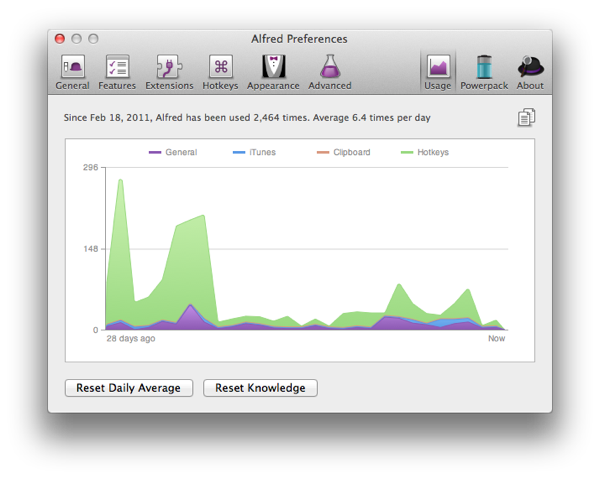
There… you can see my Alfred usage stats… i don't actually use alfred that much most of the time. Like many a times i don't need to call up an application NOT in my dock - in which case i won't use Alfred. As for app switching…. most of the time I'd use my mouse… unless when I'm very engrossed in my work than i'll find it faster and less troublesome to just use hotkeys. Like if i use the mouse i'll still have to mouse over and think about which dock icon I'm being my mouse to… sometimes when I'm focused on a particular task i end up clicking a few programs in a row till i get the right one. How come i remember the keyboard shortcuts and not the mouse position? I don't know. I guess it's also a thing of you having to move the mouse over to that exact spot where the program's dock icon is… like you have to inch your mouse a bit more to the left/right… whereas you know exactly where to place your fingers… (yeah i know I'm weird…)

Screen Shot 2012 03 08 at 5 34 50 PM

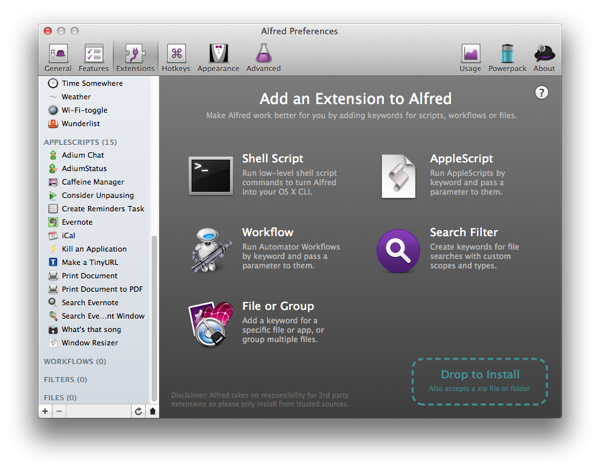
Ah, the HUGE lists of extensions i downloaded. I pretty much downloaded everything i found interesting.

Screen Shot 2012 03 08 at 5 35 01 PM

Most of them i've not used much, or at all. I can't even remember the command to trigger most of them… thankfully their presets are all very logical and easy to guess. However some of them i've used quite frequently though, like Force Empty Trash… the dilberts cartoon thing is pretty cool. Occasionally when I'm bored and when I remember, I'd use it to call up the dilbert comic of the day for 1 minute of entertainment.

Screen Shot 2012 03 08 at 5 35 06 PM

Yes… my hotkeys… touchpad gestures are cool, but not quite reliable and multi-touch gestures often fail to trigger… which is why i rigged Next/Previous track and Play/Pause to a hotkey as well.


Alfred was made with the intention of allowing you to navigate around the mac  w/o having you hands leave the keyboard. Indeed when I'm typing I'd like to keep my hands on the keyboard and off the mouse… but for the most part of the time, I'm not actually typing long, strenuous essays. I'd be surfing the web with my left hand on the keyboard and right hand on my mouse… even when I'm reading papers i don't have both my hands on the keyboard unless i want to make a quick note. So one hand on the keyboard and the other on the mouse is my preferred position… and as such my hot keys are mapped so that they are within reach of my left hand, and in a comfortable and easy to trigger manner too. The bad thing of course is that with all the keyboard shortcuts that i've set, I'll soon be running out of hotkeys to use. In fact as of now, nearly all the hotkeys i can have that triggers with the left hand only is used up. Command + something is left untouched, since that's what general system and program shortcuts are set to. Like Command + C for copy, Cmd V for paste, Cmd B for Bold in MSword, Cmd T for new tab etc etc… Option Something i've mapped to all my different programs. Apart from the ones i mapped in Alfred, many other programs have their own shortcut keys to trigger the program… which i've changed to Option + something for ease of usage (and easier to remember too).

Control + something belongs to the set of keys i set on better touch tools to resize my windows….

How to organize and remember hotkeys is probably one of the greatest challenge of the day… for me, i try and gave a logical link to things. For e.g.: i've always arranged my Internet browsers as (from left to right) firefox, chrome, safari… in accordance with how heavily i use each of them. So it was only logical that they follow the same order in the hotkeys. Similarly for the resizing of windows… i arrange them nicely from left to right, top to bottom so that by logical reasoning i can work out which hotkey is for which window position.

Of course, using the hotkeys frequently helps you familiarize with the keys and prevents you from forgetting them. But if you occasionally use hotkeys - frequent enough to get frustrated that you cannot remember them, but not frequent enough to remember them - you might wish to say, put a sticky on the dashboard or desktop so that you can refer to those stickies as and when needed. (E.g. today you need to constantly call up a particular program - than for that purpose u remember the hotkey).

I have two stickies on my dashboard delicate to the hotkeys from various different programs. I decided to make the list to help me organize my hotkeys as i decided to mass change the hotkeys provided in all the programs i frequently use. Most of the time the hotkeys are made of two modifier keys + 1 other key… and i don't like it that way since i always cannot remember which are the two modifier keys i have to press. Hence the reason why i unified almost all the program shortcut keys to work with Option + something else.

So there you have it - this is how i've modified my shortcuts keys to make using my mac more efficient, comfortable… and even more fun XD

till next time! XD

$2 VS $15

Some time back i was walking to the market to buy brunch… i was happily holding my phone on top of my wallet when *rip* my iPhone screen protector got stuck underneath the picard metal logo thing on my wallet and got half ripped off and dented :(

IMG 2038

IMG 2040

I absolutely loath it when my screen protector has a huge bubble underneath… so a few days later i went to daiso hoping to get a replacement… (that protector which got dented was from daiso too)

However to my horror, there wasn’t any in stock… and the cashier told me they ordered to stock really long ago but it hasn’t arrived yet… and it'll take goodness knows how long to arrive… so i got all depressed and decided to check out the handphone shop instead...

15bucks… really expensive! but at least then guy pasted it nicely for me (i was kind of worried actually, some salesppl can't paste it properly, really!)

but boy… the 15 bucks was worth is… the screen protector has that really nice, smooth feel that i so crave (like my dad's iPhone). Also gave the screen a nice soft, matted look that the $2 screen protector didn’t give… makes me want to touch my phone screen over and over again… haha. especially when you fingers N the screen is clean… ah the sandy but smooth texture…


so all's well… i just have to be really careful not to spoil the new screen protector… it’s the 3rd one that i changed already… the 1st one got really scratched up after my trip in chongqing o.o and the 1st time I'm changing so many screen protectors for my phone… but than again, its my 1st touch screen phone and all the previous phones i used didn’t have a screen that was even a quarter the size of my iPhone so… let's hope the 3rd one will last…! really gotta be careful when I'm holding it with my wallet next time :X

(3rd Generation) iPad - and why the iPad still wont replace computers for me

Hmm so apple is sticking on just iPad for the new erm… iPad… something like the iPods… or macbook pros… you have to say which generation ur iPod is, or when your macbook pro was made to ACTUALLY get which version/build of the product you are using.

So news of the new iPad is all over now… from the straits times:

The new iPad will be 9.4mm thick, or 0.37 inches. That compares with 8.8mm for the iPad 2. The weight is going up from 1.33 pounds (0.6kg) to 1.44 pounds (0.65kg) for the Wi-Fi-only model. The original iPad weighed 1.5 pounds (0.68kg).

And the recommended price plan for Singapore (yes, we'll be getting it next week… 16th March, that's really fast!)

Prices in SGD

16GB model - $658
32GB model - $788
64GB model - $918
iPad Wi-Fi + 4G
16GB - $828
32GB - $958
64GB - $1088

Was reading this interesting Time article about apple events…

So why do i get so interested in following the apple events online?

1st up, its fun. How often do i get to follow live blog(s) and twitter feeds about some kind of happening? Rarely… the last (and only) non-apple event that i followed with great interest was the general elections last year...

2nd: I'm an apple product user, and I'm a kinda geeky. so yeah, I'm interested in tech stuff, even if i can't afford them… i read articles on windows and android too if i come across em.

3rd: its fun to see how the rumors are right or wrong.With so many leaks and guesses and rumors floating around, its exciting to see how many of them are right. or wrong.


After last year's announcement of iPhone 4S, i wasn’t expecting much in terms of physical or extremely radical changes to the iPad… the changes announced were pretty much expected and needed. like i was using my dad's 4S, than the iPad - and couldn’t help but remark at how the iPad graphics were still pretty lousy in comparison. Better camera - that's sorely needed as well, though i still think it's really stupid to go around using the huge iPad as a primary camera… No siri - i guess its weird to be talking to a pad… but I'm still not fond of the idea of talking to my phone… plus ah, the language and pronunciation differences… till the day siri can learn singlish? LOL.

Quad core power processor is good no doubt… but it goes back to remind me how sorely lacking my processor/ram on my macbook is… now its really troublesome… i have to close and re-start apps like firefox so that they won't eat up so much ram and hang my computer. With me doing the ftp now it gets really bad… even video streaming on the browser lags… refreshes like 1 frame per 5 sec… (than i'll have to go around hunting for a window to close). Especially when I'm reading up and inserting stuff for the table that I'm doing… i'll be search on firefox, reading on mendeley, and typing things on excel and word. Opening up that extra program excel really doesn’t help… and of cos i have way too many background programs for my own good… like typinator, yorufukurou (twitter client), geek tools, a bunch of stuff on my dash board… etc etc etc… I'm even resorting to opening up apps like evernote and wunderkit in my phone instead when I'm running low on ram so that my computer won't hang :S and since my dad's not using his mac now, i took it over and i'll be using that to do my pymol instead… and when i played around with illustrator, i used his comp instead too...

And my poor computer is desperately in need of more space. After downloading a bunch of videos i have only 15gb of free space left… no good….

Same on my phone! downloaded some new songs and got better quality versions of some of my old songs and now i have like 4.4gb of songs on my phone… no wonder i had to delete so many of my apps! its like theres only about 5gb of space left for my apps… definitely not enough :S sighs… if i get a new iPhone next time can i have a 32gb or 64gb one please??? T.T heck even with 64gb I'd be able to fill it all up… i  really want to rip the classical music CDs my dad has and put them in my comp - the make for great listening when working - but my phone and computer is running out of space… ><

I'd need to get an external hard disk and really really soon too… sighs… this is really bad!

oh holy freak… the IT show starts today… epps… i need to go and get an external hard disk! :X


Hmm so the iPad is really good and all, but i its still kind of lacking for my needs… some people have even ditched their computers for the iPad (kind of).

Games wise… no flash, so i can't play my games on kongregate… but there are so many tons of games on the app store, so that's not a problem… so imma gonna talk about iPad for my working (i.e. everything besides gaming, since I'm not really WORKING yet) needs.

As mentioned in the article, i think a keyboard would be really important… the on screen keyboard is not that bad to type on really, but one thing that frustrates me really badly is that somehow the layout of the backspace buttons is slightly different from that on the iPhone. And since i got used to my iPhone keyboard 1st PLUS i HARDLY use the iPad, when i do have to type something on the iPad, that becomes quite a bit of a problem.

I muti-task and switch programs like there's no tomorrow. I do several different things at once… and switch programs a lot… (like now my file has finished downloading, and I'm off to start another download)...

*ok back to this post*

When I'm blogging i often have to google things… when I'm consolidating my background info i switch between reading papers, searching for new papers, and the word document all the time… when I'm doing stuff like blast or clustal that's even worst… despite their multi tasking function introduced in iOS 4, it still isn't good enough on the iOS for me… there's a stupid pause while switching (partly cos not enough ram?) between apps and double clicking on the home screen button sometimes doesn’t work and you end up return to the home screen (and there u have to double click again)… all these doesn’t make app switching very appealing for me...

oh and i copy things between programs A LOT, so my clipboard manager program is vital in my workflow (like i can pin snippets and recall them with a shortcut key)

And there's the problems of speciality programs like pymol or say illustrator - you don't get those on the iPad, and for those times when you have to use these programs, its still the computer for you.

If you don't have any of the above problems or habits though, the iPad certainly had its advantages. Like it has a way better battery life than my mac for example. and you can have it with 3G (or 4G…) - like sometimes when i bring my computer out and work else where, i end up having to use the 3G from my phone (through a usb cable at that, since my phone is a 3G… and that drains my mac battery even faster). In spite of the wireless@sg initiative, the connection doesn’t work more often than it DOES for me… like sometimes i won't be able to connect to it at all, at other times i cannot log in even though I'm 1000% sure I'm using the correct password.

There's a lot of apps on the iPad… and for normal stuff, it'll probably suffice… like even if I'm reading my papers, i can use any pdf reader to open up my paper (there are tons out there), and i can search for the papers on safari, and then type on an office program or Apple's pages program. Only thing is that i can get things done a lot faster if I'd to use my computer instead… :X So yeah, i can get my work done on the iPad, but for what I'm doing, it'll probably be more efficient on the computer instead.

So yup… you won't see my using an iPad to do my work any soon… :X


EDIT: Ah i just realized today that there are muti finger gestures that you can use on the iPad to make app switch easier. Sill… you can't quite organize your files and documents as well as on the computer… and with my FYP i've got so many files and over a hunted papers now… and that's way lesser than the thousands of papers those full time researches would have kept in their libraries :X I can work with the iPad if i wanted to, at least i can do certain aspects of my work, but i still don't think that for my purposes it'll work better than on the computer… :X

flats and alcohol

1st up…

Happy Birthday WX!

So i went out for dinner last night with WX, joanna, mich, wx's sis n her pro sch friend...

The night/evening started off really bad for me… when i decided that for once I'd try to be more 'lady-like' and put on a pair of flats instead of my usual sports shoes… so i put on the fairly new pair of clarks shoes i got… BAD CHOICE. esp not to wear it with that small socks thing… the last time i did the socks kept falling out every few steps so this time i thought I'd go without it. TERRIBLE MISTAKE… it was super painful… by the time i crossed the road i was thinking of going back to change my shoes… but i decided to walk on till the mrt station… and got some plasters from 7-11… but they didn’t help and when i saw the blisters on my toes on top of the rubbed off skin on the back of my feet… i decided that there was no way I'm gonna enjoy the night in those (stupid) flats… so much so for my attempt at being 'lady-like' (hey i did wear some nice clothes ok! and a necklace too! like the last time i dressed up to meet up with friends was during my sec 4 farewell dinner!)  now my feet are all aching and worst still, they have swollen! from that short 20mins walk…. zzzzzzzzzz it wasn’t even this bad the last time round - although i wore socks and i didn’t walk like quite as much? idk… grrrrrrrr. 1st: I'm too used to wearing sport shoes… 2nd: the pair of flats aren't run in yet, since I'm only wearing sports shoes 3rd: my feet are kind of big, esp the front is really broad… that makes it hard for me to buy shoes in the 1st place and provides less opportunities to wear stuff other than my sports shoes (and of cos, i really don't like wearing flats - comfort issues aside). even for my sports shoes, i wear US 9 or something. men's size. women's ones are too small for me… :X

okok, enough abt my stupid feet, back to the main thing


Went to this cuba restaurant at clark quay which has really nice ratings and a 1 for 1 happy hour thing… for meals and drinks.

I got a mexican hamburger...


IMG 2310IMG 2312IMG 2311

Hmm yes… hamburger with something like pita bread (erm what's it called? it’s a bit late now and my brain aint working properly) instead of the regular bun… and side of tortilla chips with sour cream. Unfortunately the beed hamburger wasn’t that good though… it was a bit too charred for my liking and very dry… and none of the beef taste that i so craved for. The pita bread was good though… i think the top slice of the bread thing was the best thing in the whole dish… i was toasted nicely, warm and fragrant when i ate it… there was like… mozzarella cheese in between that slice of thing too and that really tasted amazing! i ate the burger layer by layer top down so yeah…  by the time i got to the bottom slice it was cold and not as tasty anymore…

so yeah… we got like a cranberry vodka each… and that was… really bad. nothing like the absolute vodka i tasted at home. this one's really diluted… and the cranberry made it really sweet… like ribena. i CAN taste the alcohol, but no way you can get drunk on THAT unless you drink like 20 cups or more… and by than you'd be bursting from the water already… yeah… in other words, its really diluted, and really expensive. (thankfully the 1 for 1 made the price a little more bearable… heck its only like 10% vodka in that cup or something)

we ordered two jars (yes, really, literally, glass jars that ppl would store say… pickles in or something) of mojito and shared. i 1st heard of it when watching AnShi… and since it was a map show i only knew the drink was pronounced as 'monhitoe'… didn’t know it's spelled rather differently. but meh… the drink didn’t look anything like way i was expecting… there was a HUGE mass of mint leaves in the drink… like way too much i swear… it made the drink filled with the bitterness of mint leaves and mint leaves only… I'm sure the drink is not supposed to taste of mint only… and the bitterness… does make you feel like you are eating wild grass… its a bit like there's the taste of grass in there… like instead of 鱼腥味 we have 草腥味 (instead of the fishy taste, we get a grassy taste).

i drank a lot - i was really thirsty somehow… but i wasn’t the slightest bit affected by the nonexistent alcohol :S

price was ok though… we ended up having to pay only 27 bucks each… but only because of the 1 for 1 promotion… if not for that promotion, I'd be dead broke now… would have nearly cost me my entire week's pocket money :S eww… :X not quite worth it to go to this restaurant IMO… drinks - drinking at with the bottle of absolute vodka we got dunnoe how long ago from the duty free shop the last time we went overseas is better… food… the cajun chicken that mich had was good, but w/o the 1 for 1 its like 24 bucks… i think i can get better food elsewhere with that money...

meh… overall the didn’t change my impression of clark quay… overpriced and filled with angmos… well i've never been one for clubbing… I'm a geek remember? i prefer staying up till 5 in the morning typing on my mac or playing games :X

After that WX went 7-11 to buy a lime vodka shot or something. it was a vodka but with some kind of flavoring which i think is lime but forgot what she said… really puny bottle that costs 10 bucks :X (which i happily stole a sip of). nope, she didn’t get drunk on that either (obviously…)

ah something quite interesting happened though… some mysterious person gave WX a bouquet of flowers… i though it was joanna but she denied it… and it wasn’t anyone else in the gang… really weird…! we spent quite a bit of time afterwards trying to figure out who the mysterious person was...


So at the end of the night, WX was nowhere near drunk as she so desperately wanted to be...


hmm… ok, I'm getting really tired… time to sleep!

new iPad?

Twitter is my friend now… now that i post much to twitter, but i read a lot from there… like news snippets from straits times or today… i read a lot of articles from Time too...

Like now… I'm following tweets from cnntech and techland abt the apple iPad event…

EDIT: Here's a nice summary article about the new iPad

Here's my commentary on the event/tweets… credits to cnntech, techland, macworld live blog and Time live blog.

"Tim Cook is saying that people love the iPad more for email than their desktop, laptop, or phone. Same for Web browsing. They like it better than e-readers" - totally agree… my dad LOVES reading his mails on the iPad so much… its like the main reason why he actually bought an iPad 2 last year… nowadays he pretty much lazes in the lazy chair or seats at the dining table reading his mails or surfing the web on his iPad… like say reading tech reviews about cameras etc...

"New iPad resolution: 2048 X 1536. That's 3.1 million pixels on the device. 264 pixels per inch." - i think that's pretty much what most ppl expected already? Its rather expected after all - the iPhone 4s has such a nice screen but the iPad 2 screen is still pretty… lousy. so all's good here.

Bumped up iPad camera… again its pretty expected. the current iPad 2 camera is again, rather lousy. 5 mega pixel back camera… not bad… records in 1080p video… ok… isight camera on the front.

voice dictation is here on iPad… is siri on the iPad too??? dictation works in eng (US, british, australian - it still won't understand singlish), french, germany and japanese… neat… that's more languages than what siri can handle (i heard that siri is coming to japan soon tho)

still no name for the new iPad...

oh and it'll have a quad core chip AND 4g LTE connection. wow neat… that's everything that the most ambitious of rumors were talking about.

Now talking abt the 4g and LTE stuff… all i care about it is that things will load faster… IF you have a 4g device and a 4g connection.

"Additionally, software to make it a personal hotspot. If your carrier supports it, you can share the high speed network from your new iPad with up to 5 devices." - that's good…

Schiller: "This new ipad has the most wireless bands of any device that has ever shipped, and it is truly revolutionary." - yeah indeed… i don't even know what all those short forms stand for...

Dan Moren: The new iPad delivers the same: 10 hours of battery life, and on 4G it gives 9 hours. Team has worked incredibly hard to let you use it all day along. Amazingly thin at 9.4mm and 1.4 lbs. - oh cool.. the battery life is as good as before

oh and the prices! it’s the same as iPad 2 prices omg… my dad is so gonna regret buying his iPad 2 a while back… ok.. that was like 3 months ago already… but still…. :X

Release will be on 16th march… ooo apparently singapore is on the list of 1st release launches together with hong kong and japan… not bad. they are rolling it out even faster than ever… 25 more countries will get it the week after.

Now they are showing off some apps on the new iPad...

iWork gets a revamp to make better use of the retina graphics… still same price and it’s a free upgrade for those who purchased it already. update available today…. grrr… now u're tempting me again… (but wait, i don't have an iPad!)

Garage band and iMove got an update as well… like u can now have a jam session with 3 others using wifi or bluetooth. Garage band update available today too, $5. iMove - now u can also make a movie trailer, not just movies (what's the diff??? :S) "Select from styles and templates, and you get a simple interface for creating your trailer. Fill out your outline, your movie studio name, director, etc., and tap on your Storyboard, and shows you exactly which shots you need. Then you can use the 1080p camera to record the video." oh ok… i'll just pretend i understand. Once again i don't have any of the iLife apps on iOS. iMovie is also 5bucks.

oh wow, iPhoto is coming to iPad… watt's it gonna do?

ah so it'll let you edit photos… just like photoshop, snap seed etc… but it probably has a much slicker user interface. Its an apple app after all. "Double tapping the thumbnails finds similar photos, puts the up side by side for you so you can compare them. Swipe down to make one disappear." wow… that's something i've not seen any of my iOS photo editing software do. (but than again, I'm on the iPhone)

"Once you've got photos, tap share and you can email, Twitter, Flickr, Facebook." just like in my mac iPhoto…

"Once you've chosen them, you can make them look even better. Auto-enhance button to alter contrast color. Tap on crop tool and iPhoto will analyze and find horizon line. Touch button and it straightens horizon line." "You can always compare the original with the one you're working with." - sounds advanced and all good to me.

"Crop tool has multitouch. Pinch to zoom, rotate with fingers. Grab corner to change cropping or tap gear to bring up common sizes." - seems like everything is well thought out to make it work GREAT with the iPad.

"Too light or too dark? Exposure tool with unified tool that lets you adjust shadow, highlights, brightness, and contrast. Shadows in lower left corner are too dark. Touch finger at that point, brings up control. Touch and slide up and adjusts the level." "Sometimes you want to adjust just a portion. Touch in the sky and slide to the left and you can darken or lighten the sky." -  holy !$#@$@#$$! this is COOL! the bad thing for me though… is that i hardly have time/be bothered to edit photos these days… hmm...

meh… but iPhoto on the iOS sounds really great… like for normal, simple editing, it'll be easier, more convenient and faster to do it on the iPad than on photoshop

"It automatically lays them out onto pages, one for each day of the trip. They all get laid out in this beautiful layout. If you mark them with a caption or as a favorite, they will be moved to the larger spaces. But you can adjust it by tapping Edit and you can pick up and move around photos." - the journal feature sounds really good too… great if you're traveling and taking pics with your phone or iPad… wait can i get iPhoto on my phone too? my nub, old, dying 3g. ok, its not dying, its just running out of space. that journal feature can easily publish pics to share online too...

(wait, watt's the name of the new iPad again???)

hmm so with that, all of iLife is on the iPad… iPhoto at 5 bucks… seems really worth it IMO… available today! (ok, available today, but not NOW. at least its now in the sg iTunes store yet… yeah, garage band etc haven been updated yet too)


old iPad 2 will still be sold, prices dropped by 100bucks. (i wonder how my dad will feel about this…)


wait… that's the end??? eh… seems like the new iPad will just be called… erm… the new iPad…?

hmm no siri for the new iPad either… they really wanna keep it iPhone exclusive eh?

EDIT: Apple's PR says the new iPad will just be called the iPad… hmm… so they are kind of making it like the MacBooks… same name, but specs are very different… ok...


Summary of the new iPad

Release date: 16th March in US, Canada, UK, France, Germany, Switzerland, Japan, Hong Kong, Singapore and more. One week later, 25 more countries.

Price: New iPad is priced at just $499 for 16GB, $599 for 32GB, $699 for 64GB. And $629, $729, and $829 (all USD) for 4G. Same prices as iPad 2.

0.37 inches and 1.4 pounds (slightly thicker and heavier than the old iPad 2 at .34 inches and 1.33 pounds)

Specs

2048 by 1536 pixels, 264 pixels per inch, over 3.1million pixels in total. Breaks the record for the most number of pixels available in a mobile device.

A5X chip quad core

iSight camera

5 megapixel back camera

1080p video recording, video stabilization, temporal noise reduction for low light. Great edge-to-edge sharpness. Auto face detection. Auto exposure lock and auto focus lock.

4G LTE, fast 3G HSPA+ and DC-HSDPA networking, 3G world ready, Personal hotspot, most bands ever.

Voice Dictation in US, British and Australian English, Japanese, French and German.


Other things…:

They announce a new apple TV

iOS software update - Everything in the iWork and iLife suite will get an update, and iPhoto will join the iLife iOS ranks… and it'll be priced at 5USD.


Since the chances of me owning the new iPad is close to zero… what' most excites me is the iPhoto on the iOS… it could turn out to be really useful… erm… if i make use of it… :X but considering and amy i've already spent on iPhone apps… another 5bucks isn't a big deal… like i'll just have to refrain from buying some sushi for supper and I'd save enough for the app… :X now but that's if i use it… if i don't use it much, it'll still be 5bucks wasted :X we'll see… as for now it's not in the iTunes store yet so… if i do get it though, my dad can use it on his phone and iPad too so its not too bad i guess… we'll see.

Tuesday, March 06, 2012

Of skates and wheels

Hmm ok, I should give an update on the cycling trip on sat...

We only cycled for 2 hours, but i ended up getting burnt still...

Since darling wx cannot cycle, but CAN blade, we decided that me n mich will ride while she blades… since i don't feel like cycling a double and neither did much...

Unfortunately, the last time wx bladed was in pri 2. *Clap*

So she was standing still and scared in front of the bicycle/skate rental shop and the helpful mich happily bounded off to help her… which turned out to be a bad thing. Far too afraid to move… much decide that wx shall cling on to her bag while she cycles to bedok jetty… so a very hilarious (but slow) ride ensued. Now and than I'd hear a scrapping sound when dry leaves get stuck between wx's skates...

IMG 2049

We took a super long time to reach bedok jetty… upon reaching we made wx attempt to learn cycling (again)… which she did for 10mins -.-'''

(at this point… i must say, i think xl is a real genius… let's go cycling together someday!)

after that we decided to go back… xl gave up and decided to run/jog/walk back… (in slippers, yay!) and i carried her bag for her while she held on to her skates… (and gosh, i realized that carrying two bags at once while cycling is a BAD idea… cos my backpack took up all the space on my back, so wx's bag slid down to the side/front… making me burdened with two weights pulling me in diff directions :S - plus I'm not fit….)


after attempts to wait for her and stuff… me n mich decided to just ride ahead. at the end i just sat at bk and slowly waited for wx to arrive… and when she did… bravo! she was SKATING perfectly well! LOL. like i told her at the start - its not that she forgot how to skate, its just that she's afraid to skate… somehow her desperation made her overcome that fear… (like it was taking her forever to reach the rental place, and kids were skating by her while she was looking like an idiot CARRYING a pair of skates…)


I also realized while sliding down a slope that i CAN ride hands free… (but not for long)… its just that circumstances often make it hard for that to happen, like the in coming traffic… and of cos my FEAR, which i still cannot overcome. The thing is that my bike at home has thinner wheels, so that might make things a bit harder… plus i don't take my bike out for a spin often enough :S so far i've not done handsfree on my bike yet… only did it with my old bike and that was super long ago...


oh yes… we went for lunch after that. at ichiban boshi @parkway parade

IMG 2055

IMG 2057

IMG 2059

IMG 2061

and then we went looking for shoes after that… was quite hilarious cos mich n wx were both trying on a pair, but insisting that the other was nicer… so in the end they ended up trying wat the other was wearing… the shop assistant were having a good laugh at the two haha.

Friday, March 02, 2012

sch and such

hmm so i haven posted here in a while...

in truth tons of things i want to blog about...

but no time...

so this shall just be a short post...


schools the same, 51 days till my report is due… and still getting no where with nothing. no good...


going out cycling with my friends tmr morning! roots, finally get to see ash after EONS. can't wait!


WX invited us to go dinner + clubbing next wed… nor been clubbing before, not sure if i'll go… cos its ladies night so yeah… meh…

Thursday, February 23, 2012

Days long forgotten

IMG 2010

That's the water bottle I'm using now… yes, the water bottle they gave us during JC1 orientation… that's like 6 years ago… seems so far and so distant. My sis sent me a youtube video of the RI(JC) IHC opening video for last year yesterday… and i started watching the rest of the related videos… amazingly i found the ultra lame video they showed us during orientation… the one about the different houses being greek mythology gods/goddesses and being banished to Z'kardia… got tons of dislikes and flames on youtube though… LOL.

But its kind of nostalgic… watching the orientation dance of the other batches and all (couldn’t find any for my batch tho, sad). Seems like in the recent years they started making really nice MVs of the orientation dances. And than there's the sun dance that's passed from one batch of OGLs to the next… i really liked watching that dance during my orientation… the dance is cute, hilarious… and really simple to follow - i did it once during the orientation… when the whole OG stayed in sch till like midnight to dance and have fun. I told myself during the orientation - when we just started doing the batch dance - that i was gonna do it properly and enjoy myself… and i did have a good time. Don't regret it, cos that was like the last time I'm ever gonna do something like that again… mass dance and all… didn’t go for uni orientation… and don't think i'll ever do something like this next time… Yeah… the batch dance… its really hard! Rather lengthy and all different moves… different moves for the girls and the boys… and they don't constantly repeat moves that kind of thing… I was talking to someone from another JC that time (when i was in J1 and we just finished orientation, it during during CNY when we were visiting my parent's sec sch friends)… and she was like 'what? you all only have one dance? so lousy! and how come you all can't remember the dance? we have like 4 or 5 (i can't remember how many) dances and everyone can remember all the moves!' Than she showed me her orientation booklet and i understood why… One dance consist of just 10 (or so) short moves (things like box step = 1 move) and the 10 moves are repeated over and over again throughout the duration of the music/song. Of course everyone can remember them. Ours? Some ridiculously hard dance (really, a dance!) with all sorts of different moves for the entire duration of the 4min? song that's impossible for normal people like myself to remember the steps to… without having my OGL there to demonstrate that is. Its like i absolutely can't remember what's coming next kind of thing. But still, the dance was really fun… I really enjoyed myself during the orientation...

Perhaps you can say that it's really stupid of my sch… to have such a difficult dance that like no one can remember… and that its better to have just a very simple dance that everyone can groove to… perhaps…? Well its not that my batch dance was difficult or anything… its just that we can't remember the steps and need someone to show/remind us - something which my lovely OGL did most of the time. We CAN do the steps, but we CAN'T remember when to do what step :X does that even mean anything? haha… still… we had fun and that was what mattered most. Granted, there were many ppl who absolutely hated it, but its really how you want to look at things… doesn’t matter whether the dance is easy or hard or stupid… as long as you tell yourself 'I'm going to enjoy this', you will.


Anyway back to my water bottle… started using it either last year or last last year after all my previous water bottles ended up in failure… either they got moldy or they leaked etc etc… Really like the aluminum water bottles… especially this one that's in my favorite shade of blue… XD Especially when you fill it up with cold water from the water coolers… The whole bottle will frost up almost instantly and ah… the nice cool 'ice pack'! And after leaving the bottle in the cold lecture theater (or anywhere cold) for a while, the water instead is nice and cold too XD Love it! Only thing is that every time it falls… Its gets dents… and with the stupid lose side pocket of my bag, that happens quite a lot… :X So much so that i've just taken to securing the bottle with a carabiner to my bag strap… o.o


Okays… I should get back to work now!

Monday, February 20, 2012

How do you like your music?

How do you like to listen to your music? Do you frequently make and change playlists to listen to? Do you use some online music service that auto selects songs for you (something i don't use, so i don't know much about it…)? Do you let iTunes or your choice of music player pick songs at random for you, or do you play it in some sort of order (alphabetical? by date?)

I'm a person who likes to be in control of what i listen to… so even if i use shuffle, I'd skip those songs that I'm not that fond of listening to. I'd often make playlists of just a few songs and listen to just that few songs over and over again… or better still, have just one song on repeat over and over. Like if i just downloaded a new song that 'just hits the spot' I'd listen to it (and only it) day in day out… till either i finally get sick of the song (maybe a week or 2 later?), or till i download even more new songs (than I'd probably be repeating a few songs, instead of just one).

When i get hooked on a song… its like I'd listen to just that song the entire time when I'm traveling… or if I'm out shopping… that's something that my sis absolutely can't stand… which also explains why the stats in my iTunes look like this:

2012 02 20 09 38 16 pm

heh… i really love pikanchi… at 300+ plays its my top played song… next up with 230+ plays is attack it… Attack it is a much shorter song though, so its not surprising that i listened to it so many times already… for the time i take to listen to pikanchi once, i can hear attack it 1.5x already… Evidence of how crazy i can get over a single song --> Kaze. Played over a 100 times already… and the truth is that the 1st time i heard it properly was just before CNY. I added the Time and Dream a live album at the same time, so I was busy listening to other songs like Once Again, Carry On and My Answer (which i really like too!)… those songs are great too, but kaze really was IT… i played it throughout the time i was cleaning up the house… made my spring cleaning experience much better XD

I guess what i like about pikanchi is that it's a rather angsty song? i like angsty songs XD

Normally i arrange my songs by date added though… and i'll listen to the last few songs added to iTunes… Went on a iTunes adding spree last night/this morning though… took quite a while but i've finally finished adding all arashi album songs into my iTunes library! Gotta do things like fill up the artist names and album names properly ya know..? and finding the kanji lyrics too… A huge thank you to yarukizero on live journal! I took a lot of the lyrics from there…! The rest came from jpopasia. Next up would be to fill in the remaining arashi songs that appear in their singles, but didn’t make it to the album… like most/all? of what they call the 'side b' songs? Not too sure what it means but.. i guess it's like the old days of the cassette tape where there's side A and side B… and side B would be the 'not so important' songs kind of thing? Perhaps...

I wonder how many songs arashi has released thus far o.o

Downloaded some music box versions of arashi songs too… quite cute, really love the music box versions done by yukimusicbox on youtube… a bit shrill but its fast paced and light hearted… some of the other versions i heard were kinda slow and lower pitched and made the song sound rather heavy… which defeats the purpose of me listening to a music box version. Well i guess it can be calming and stuff, but i've always been a sucker for fast music so XD

hmm… now over a 3rd of my songs are arashi's… including all that random music box versions and stuff...

ok, that's all for now…!

Mountain Lion coming... and Messages Beta!

Warning: Rants and more rants coming up. I'm here to talk/rant about the features showed in Mountain Lion thus far, not do a proper introduction of the features!

NewImage

So a few days ago Apple announced that it'll be coming up with a new OS X - Mountain Lion in summer. I pretty much read all the top news/review articles from google that day… and here's what i feel about the new OS...

Am I excited about the new OS? Yes… No… Maybe? Definitely not as excited as I was for Lion. Could partly be the 'newbie mac-user' effect wearing off or something… could be that it was JUST a while back when i upgraded my OS… and the excitement doesn’t build up that fast again… or it could simply be that the new features aren't enticing enough for me.


It was just last year that Lion was released… so in just one year's time a new OS will be out. I'm kinda dreading this actually. New OS means that IF you want to 'keep up', you'll have to spent money. Grant, mac's OS aren't as expensive as windows, but still, it aint the 'just a few dollars' typical of iOS app store prices kind of cheap… after all I'm still a student with no income, shamelessly using up my parent's $$$ for buying everything and anything :S. Like the previous time round… I paid to upgrade to Lion (with my own pocket money), and i paid to get the new version of iPhoto too… still, I enjoyed the photo stream enabled iPhoto a lot… so it was worth the buck. Ah yes, the newer iPhoto versions that lets you uploads photos to any folder in Facebook is EXTREMELY useful for me.

Hmm, how about Lion than… its hard pressed to say exactly how Lion is great… partly because I've forgotten what's new in Lion already. One thing i know though, is that I hate Launchpad. Or rather, it was practically useless since I use Alfred to launch all my applications (now I'm using Alfred to do even more things, but that's for another post). The new expose is good, at least it makes things less crowded and expose more usable, since I always open a TON of apps and windows at once (and I don't use spaces - maybe I should? But that's for me to think about and try some other time…). A lot of features like airdrop, and version history (seems to only work in iWork, but i DON'T have) in Lion are useful, but are things that I don't use...

That seems to be pretty true for what I've seen on Mountain Lion thus far. Things like twitter  integration are cool and make we WANT it, but its really JUST a WANT and not a NEED. I hardly use twitter unless I make a conscious effort to… and I hardly ever use the twitter integration features on my phone even… would I use twitter more simply cause its integrated into the OS…? I don't think so. As it is, twitting is convenient enough for me already. I can tweet from my firefox address bar, I can tweet from Alfred, I can use Option + T to call up YuroFuko, a twitter client that I use (and really like)… I even paid 6 bucks for a program to export photos from iPhoto to twitter - but I've barely used it :S. Opps… :X

Notifications center…. sounds cool, but do I need it? I don't quite think so… why? I don't use my computer like my phone… where games and apps will have notifications to send me… The most prominent app that notifications would be useful for would be the Mail to me… what else? I really can't think of any others… But the thing is - I don't use the build in mail app in mac. I prefer to check my mail from 1) my phone… and 2) the browser. So unless there's some app/link that forces me to open up mail (to send an email to the developer for example, I'd be too lazy to open up my browser and copy and paste the email address, that'll be redundant anyway), I won't use my mail app… and I don't think that habit will change even in the new OS.

Ah, calendars would be a good thing to have notifications with… but i don't use it that much… and calendars as it is now, and  on my iPhone is quite enough.

Also, I already have Growl installed (went to check out the new version, gosh, you gotta pay $2USD for the latest version! And the thing is, I don't quite get what's new… its not that I don't support the devs, but the older version of Growl is serving me just fine so I'll keep the 2bucks for myself…). Growl is really a fantastic app that works with just about anything and everything. If you're a mac user I'm sure you have it already right? If not you should go download it… It shows notifications for your apps, like when my firefox finishes the download, or when someone sends me a message on adium… or when iTunes starts playing a song… etc etc.

China friendly measures… hmm this one. Well, I'd be pleased to have easier chinese language inputs… but that's about it? I must say though, I HARDLY type in chinese though… and even if I do, its just a few words… Mail support for QQ, 163 and 126… doesn’t affect me since I don't use these services. And how about things like searching in baidu, or video uploads to tuduo and youku? I just open up my chrome window, and click the shortcut there to get to baidu, and than search for the videos I want to watch. I don't think that'll change any soon. And oh, I'd still set my default search engine to google rather than baidu… (and wait, i don't even use safari much in the 1st place!). Video uploads? I don't upload videos much… like so far I've uploaded 1 video to youtube? Yes. ONE. Does it affect me? Sadly no. I use tuduo and youku to watch videos, not upload to them...

Quite a lot of tweaks have been applied to Safari… but unfortunately, I prefer the using Firefox as my main browser… and Chrome as my secondary browser. Sorry Safari, but you're 3rd… I love Firefox for all the add ons that I cannot live without… and ah… the keyboard shortcuts. Safari using command + number to go to the site in the bookmarks was a HUGE deal breaker, sorry. I open up loads of tabs, and use the numbers command to switch between tabs quickly. I just installed a Safari extension to change the keyboard shortcuts, but i only lets me use control + numbers to switch between tabs… that's a little confusing ya know? Since its command + number for firefox and chrome, and I switch between the different browsers a TON more often than I switch between Mac OS and XP (where everything is Control + something instead of Command + something). There's probably some complicated and sophisticated way to change the Safari keyboard shortcuts, but I'm just gonna stick with Firefox.

I guess the changes would be good on my dad's computer though, where he's using Safari and Safari ONLY… that is if we upgrade to the new OS this summer… and if I don't install firefox or chrome on his mac… (but i hardly use his mac anyway so…)

Ah, they brought some iOS apps over to the mac, and they renamed some apps like the address book to contacts, following the iOS. That's what should have happened earlier IMO… or have the iOS follow the mac OS in the 1st place… but yeah, it happened to me once… I wanted to call up the address book on mac, but no matter how many times i type 'contacts' into alfred, if didn’t find anything. It took me a while to remember it's call address book in mac. My dad was similarly confused by the different naming between the iOS and OS too… Notes coming over in mac.. that'll make the notes app on my phone more useful. It'll also be nice to be able to access my notes on the computer… but I'm equally inclined to use pick up my phone and opening the app to see what's in it. Bringing reminders over would make that app more useful… but maybe too little too late? IDK. I was using reminders for a while, than I realized it was a little chunky and not very nice to use - like the layout looked pretty boring and stuff… so now I'm using Wunderlist - which is free and is available on the mac as well (yeah free cloud syncing). It just looks better than the boring reminders for one. Now I kinda prefer just my multicolored pen and my notebook though. I jot down things during the meeting, than mark with numbers what needs to be down… and doodle all over with the different colors… I do need to improve on my handwriting though. Calendar… yeah I'd appreciate it if they bring back the calendar switching panel again.

Hmm… that's pretty much it? Airplay mirroring - no Apple TV, so no use… iCloud integration… good but… documents in the cloud… does it work with microsoft office? If it doesn’t, than sadly it won't be of much use to me… Also, I'm already using things like SugarSync to sync my FYP folder… and since I don't have a desktop - I use my macbook at home, the only place I might need to sync my documents to would be my phone and honestly i don't open documents on my phone much… nowadays the only thing I do on my phone when I'm taking the bus or train is to listen to music. Pretty much nothing else...

GameCenter - I don't have much friends on GameCenter… and as for friends that I actually KNOW in person, I only have 1 such friend in my list… :S So yeah… GameCenter on the mac really isn't appealing to me… and I'm still waiting for the mac app store to have more, and better games.

Gatekeeper… well i guess it adds a bit more protection on top of how mac is already rather impervious to viruses… they continue their mac store push here though… something that i think is not very nice, considering the bunch of restrictions they are putting on apps in the mac app store. Still, i don't think this is a feature I'd be relying on much. back when my old vista computer was still alive, i didn’t have a single firewall or anti virus software on. And my computer was fine… Yeah the hardware got fried, but that's a totally different matter… my computer didn’t crash because of a thousand viruses or something… my accounts didn’t get hacked etc… now my computer, both mac and XP, doesn’t have any anti virus software either :X… so yeah… ><

So well… there isn't much about the new OS atm to really excite me, or convince me to buy it. Things like twitter integration is nice to have, but I don't foresee myself using it much. Notes for the OS is good, but there are free alternatives like the newly released Wunderkit (which I just stumbled upon when I checked out the Wunderlist website - the pro is free for 90 days, after which you won't be able to edit other people's workspace - something like how only pro users can edit let other's edit the notebooks shared to me in Evernote, but I don't quite need that feature). I wonder what else is installed for Mountain Lion… maybe I'll end up holding up for the next OS.

Hmm… Apple has released iMessaging for macs though! At last! It's available as a beta download for Lion users, and it completely replaces your iChat application. You can download it from their site… installation requires a system restart though. I don't use iChat so I never knew what it was like… but apparently the new Messages app allows (what used to be) iChatting, and iMessaging. It also supports AIM, Yahoo, Google talk… too bad I only use msn. Why? Because that's the trend in Singapore. We are somehow, pretty much MSN users only… so I don't use anything else either. No point for me to use things like QQ when I won't have anyone else to talk to yeah? (Even on MSN, I hardly talk to anyone already.) So Messages to me is a great way to spam the phones of my friends using iOS5 with iMessages. You type a lot faster on the computer than on the phone after all.

Some things about Messages though - it sends out with your apple email address. Meaning that the receiving party will see that XYZ@XYZ.com has sent them a message. If they don't have your email address saved in their contacts, they might not know who you are.

Messages can send out the iMessage to either the contact's email (the one associated with the apple ID), or the phone number. Beware when selecting the email address though… they might not receive it if the option to receive messages from their email is not turned on! I spent quite a lot of time figuring this out on my dad's phone… worst still is cause it took quite a while for the change to actually take place, so I practically gave up already before my dad finally started getting the iMessages I sent a while ago to his email, on his phone. Complicated much? Yeah it sure was complicated for us. Also, since you are sending out the message with your email rather than your phone, the conversation will be in a separate thread from if you send the sms out with your phone. Its like receiving 2 messages from 2 different phone numbers… only that in this case, one is an email and the other is a phone number. Yes, it'll make a separate thread even though you have both the email and phone number in the same entry in Contacts. So you end up with two threads to the same person. A bit weird/stupid if you'd ask me. It's the same if you send out an iMessage with an iPad. It'll create a separate thread for that since it's sent out with your email (same thread as sending out from Messages for the mac).

Ah… contrary to the picture on the Apple website… the beta version of Messages has the chat bubbles in a cute pink and purple instead. Unless there's a difference between iChat and iMessage? IDK.

2012 02 19 11 00 55 pm

Well I censored off some bits of the conversation… don't mind that yeah...

There's also a FaceTime button on the top right hand corner… so you can FaceTime with ease… yeah. Emoticons are quite limited though… I miss my emoji keyboard on the iOS. You CAN see emoji in Messages though. The emoticons work just like in MSN… like the zipped up mouth guy is actually :X when I look on my phone. I'd actually prefer it if they don't auto change the emoticons… since some of the emoticons look weird anyway. Still, Messages is really fun - but only when you have someone to spam of course. Ah… just thought of a few more friends using the iPhone that I can bug too… XD

Ok, that's all I have to say for now. Heh I guess I've ranted enough already anyway. Nite nite!

Thursday, February 16, 2012

New blog template!

Picked another template cos i realised the previous white on black gets really tiring on the eyes...

maybe when i have time i'll pick something nicer... and something that i really like.